How To Start STP in PPFAS Mutual Fund?


Finance Guru Speaks:  This article will guide you on how you can start STP (Systematic Transfer Plan) from one Fund to another in PPFAS Mutual Fund (Parag Parikh Financial Advisory Services Mutual Fund)

Some details about STP: If you have a lump-sum investment in Fund X, then by using STP you can systematically transfer a defined amount (Say Rs. 10,000 per month) in Fund Y. Remember both the funds X & Y should be from the same fund house.

Many investors are using the STP route to systematically transfer the amount from Debt Mutual Fund to Equity Mutual Fund or vice versa.

It is better to register yourself to the Parag Parikh MF (PPFAS) website in order to perform online transactions like STP, Purchase, Redeem, etc. If you are an existing investor, you can follow this link to get yourself registered to this fund house. Make sure you have your Mobile No. and Email ID correctly registered in the fund house.

In this article, we will provide steps for starting STP from Parag Parikh Liquid Fund (SOURCE) to Parag Parikh Flexi Cap Fund (TARGET). However, you may select any other Mutual funds from this fund house, steps will remain the same.

Steps to start STP in PPFAS Mutual Fund:-


1. Visit PPFAS Self Invest Page by clicking here.

2. Login to your account by using Folio No., MPIN & OTP. 

Note: If you are not aware of your MPIN, you can generate MPIN through Forgot MPIN link:-

PPFAS MF Login Page
PPFAS MF Login Page
3. In the Home Page, click on Transfer -> Register STP as shown below:-
How To Start STP in PPFAS Mutual Fund
4. On the Next Page, enter the details like Source Fund (Parag Parikh Liquid Fund in our case), Target Fund (Parag Parikh Flexi Cap Fund - Direct Plan in our case), STP Frequency (e.g. Monthly), STP Amount (e.g. Transfer Rs. 2000 per month), STP Period, etc. and click on Submit button:-

How To Start STP In Mirae Asset Mutual Fund?


Finance Guru Speaks:
This article will guide you on how you can start STP (Systematic Transfer Plan) from one Fund to another in Mirae Asset Mutual Fund.

Some details about STP: If you have a lump-sum investment in Fund X, then by using STP you can systematically transfer a defined amount (Say Rs. 10,000 per month) in Fund Y. Remember both the funds X & Y should be from the same fund house.

Many investors are using the STP route to systematically transfer the amount from Debt Mutual Fund to Equity Mutual Fund or vice versa.

If you are an existing Mirae Asset Mutual Fund investor, then first of all get registered to its Mirae Asset Mutual Fund website. You can follow the options as mentioned here.

In this article, we will provide steps for starting STP from Mirae Asset Dynamic Bond Fund (SOURCE) to Mirae Asset Hybrid - Equity Fund (TARGET). However, you may select any other Mutual funds from this fund house, steps will remain the same.

Steps to start STP in Mirae Asset Mutual Fund:-


1. Open Mirae Asset Mutual Fund website and provide your User ID, Password & Generated OTP and click on LOGIN button.:-
Mirae Asset Mutual Fund Login Page
2. On the Home page, first go to TRANSACT -> STP, as shown below:-
How To Start STP In Mirae Asset Mutual Fund
Click to enlarge - How To Start STP In Mirae Asset Mutual Fund
3. Click CONTINUE, as shown below:-
How To Start STP In Mirae Asset Mutual Fund
Click to enlarge - How To Start STP In Mirae Asset Mutual Fund
4. Against your Source Fund (Mirae Asset Dynamic Bond Fund in our case), select Transact option:-
How To Start STP In Mirae Asset Mutual Fund
Click to enlarge - How To Start STP In Mirae Asset Mutual Fund
5. Enter the details of Target Fund (Mirae Asset Hybrid Equity Fund in our case) like STP Frequency (e.g. Monthly), STP Amount (e.g. Transfer Rs. 2000 per month), STP Period, Mode as Direct, etc. Click on SUBMIT button once all the required details as filled:-

5 Easy Steps To Start Weekly STP In HDFC Mutual Fund


Finance Guru Speaks: Do you want to register Weekly STP (Systematic Transfer Plan) and transfer your units or amount every week from one Fund to another Fund in HDFC Mutual Fund AMC?


If you have a lump-sum investment in Fund X, by using STP you can systematically transfer a defined amount (Say Rs. 500 per week) in Fund Y. Remember both the funds X & Y should be from the same fund house.

Many investors are using STP to systematically transfer the amount from Debt Mutual Fund to Equity Mutual Fund or vice versa. The steps mentioned in this article can be applied to start STP between any of the two HDFC Mutual funds and you can even change the Frequency to Monthly rather than Weekly. More details are in the below steps.

If you are an existing HDFC Mutual Fund investor, then first of all, get registered to its HDFC Mutual Fund website. You can follow the options mentioned here.

Steps to Register Online STP in HDFC Mutual Fund:-


1. Open HDFC Mutual Fund website and click on Login via OTP link. Provide your User ID and PAN and click SEND OTP button:-
HDFC Mutual Fund Login Page
 2. OTP will be sent to your registered Email and Mobile No. Enter the OTP, click on LOGIN button:-
HDFC Mutual Fund - Login
HDFC Mutual Fund - Start STP
3. In the Home page, click on Transact Now and then Systematic Transfer Plan (STP) as shown below:-
HDFC Mutual Fund - Start STP

How To Start Online STP In Motilal Oswal Mutual Fund?


Finance Guru Speaks: Do you want to register STP (Systematic Transfer Plan) and transfer your units or amount from one Mutual Fund to another in Motilal Oswal Mutual Fund House?

Some details about STP: If you have a lump-sum investment in Fund X, then by using STP you can systematically transfer a defined amount (Say Rs. 10,000 per month) in Fund Y. Remember both the funds X & Y should be from the same fund house.

Many investors are using the STP route to systematically transfer the amount from Debt Mutual Fund to Equity Mutual Fund or vice versa.

Make sure you have your Mobile No. and Email ID correctly registered in the fund house.


Steps to Register Online STP in Motilal Oswal Mutual Fund:-


1. Open Motilal Oswal Mutual Fund home page after clicking here and click on MF INVESTOR -> EXISTING INVESTOR button.

2. Provide your PAN No. and click on GENERATE OTP button.
Motilal Oswal Mutual Fund - Login
Motilal Oswal Mutual Fund - Login

3. OTP will be received on your registered Mobile No. and Email ID. Enter the OTP and click on Submit button as shown below:-
Motilal Oswal Mutual Fund - Login
Motilal Oswal Mutual Fund - Login
4. On the Home Page, click on OTHER TRANSACTION -> STP, as shown below:-
Motilal Oswal Mutual Fund - Start STP
Click to enlarge - Motilal Oswal Mutual Fund - Start STP
5. On the Next screen, select the Folio No. and click on Submit button:-
Motilal Oswal Mutual Fund - Start STP
Click to enlarge - Motilal Oswal Mutual Fund - Start STP
6. For STP - Step 1, click on Continue button:-
Motilal Oswal Mutual Fund - Start STP
Click to enlarge - Motilal Oswal Mutual Fund - Start STP
7. For STP - Step 2, select the Source Mutual Fund, STP Type as FixedSTP AmountTenureSTP Frequency, Plan Mode as Direct, Target Mutual Fund, etc. as shown below and click on Submit button:-
Motilal Oswal Mutual Fund - Start STP
Click to enlarge - Motilal Oswal Mutual Fund - Start STP
Motilal Oswal Mutual Fund - Start STP
Click to enlarge - Motilal Oswal Mutual Fund - Start STP
8. For STP - Step 3, check all the details carefully and then click on the Confirm button as shown below:-
Motilal Oswal Mutual Fund - Start STP
Click to enlarge - Motilal Oswal Mutual Fund - Start STP
Congratulations on your successful online STP registration of Motilal Oswal Mutual Fund :-)
Motilal Oswal Mutual Fund - Start STP
Motilal Oswal Mutual Fund - Start STP

Images Courtesy: Motilal Oswal Mutual Fund Website

Also read:

More Articles on Mutual Funds

Please help to share the article over your social network.

How To Register Online STP In Reliance Mutual Fund?


Finance Guru Speaks: Do you want to register STP (Systematic Transfer Plan) and transfer your units or amount from one Mutual Fund to another in Reliance Mutual Fund House?

If you have a lump-sum investment in Fund X, by using STP you can systematically transfer a defined amount (Say Rs. 5000 per month) in Fund Y. Remember both the funds X & Y should be from the same fund house.

Many investors are using STP route to systematically transfer amount from Debt Mutual Fund to Equity Mutual Fund or vice versa.

Inorder to register online for STP, you should be an existing Reliance MF investor and get registered to its Reliance Mutual Fund website to avail Username and Password.


Steps to Register Online STP in Reliance Mutual Fund :-


1. Open Reliance Mutual Fund home page after clicking here and click on Login button. Provide your Username and Password and click on LOGIN button.
Reliance Mutual Fund - Login
Reliance Mutual Fund - Login
 2. In the Home page, click on SYSTEMATIC PLANS section, then symbol under STP. Click on START A NEW STP as shown below:-
Reliance Mutual Fund - Start STP
Reliance Mutual Fund - Start STP
3. Select your Folio and Source Fund and click on CONTINUE :-
Reliance Mutual Fund - Start STP
Reliance Mutual Fund - Start STP

How To Register Online STP In DSP Mutual Fund?


Finance Guru Speaks: Do you want to register STP (Systematic Transfer Plan) and transfer your units or amount from one Mutual Fund to another in DSP Mutual Fund House?

If you have a lump-sum investment in Fund X, by using STP you can systematically transfer a defined amount (Say Rs. 5000 per month) in Fund Y. Remember both the funds X & Y should be from the same fund house.

Many investors are using STP route to systematically transfer the amount from Debt Mutual Fund to Equity Mutual Fund or vice versa.

Inorder to register online for STP, you should be an existing DSP MF investor and get registered to its DSP Mutual Fund website to avail Username and Password by clicking on Create your account link.


Steps to Register Online STP in DSP Mutual Fund:-


1. Open DSP Mutual Fund website and click on Log In after providing your registered Username and Password:-
DSP MF- Login Page
DSP MF- Login Page
 2. In the Home Page, click on New transaction -> Start STP as shown below:-
DSP BR MF - Start STP
DSP MF - Start STP
 3. Select your Source Fund and Target Fund. Select Plan as Direct.
DSP BR MF - Start STP
Click to enlarge - DSP MF - Start STP


4. Fill all the details like STP Amount, Tenure, STP Frequency, 1st STP installment date etc. as shown below and click on Review STP button.
DSP BR MF - Start STP
Click to enlarge - DSP MF - Start STP
5. Confirm the details:-
DSP BR MF - Start STP
DSP MF - Start STP

Congratulations on your successful online STP registration of DSP Mutual Fund :-)

Please help to like, share and comment on this article over your Social Networks. Thanks.

Images Courtesy: DSP Mutual Fund Website

Also read:

More Articles on Mutual Funds

How To Register Online STP In ICICI Prudential Mutual Fund?


Finance Guru Speaks: Do you want to register STP (Systematic Transfer Plan) from one Mutual Fund to another in ICICI Prudential Mutual Fund House? STP allows the investors to switches a defined amount at a defined interval from one mutual fund to another of the same fund house.

Suppose you have made a lump-sum investment in Fund X so by using STP you can systematically transfer a defined amount (Say Rs. 3000 per month) in Fund Y. Remember both the funds X & Y should be from the same fund house.

Many investors are using STP route to systematically transfer amount from Debt Mutual Fund to Equity Mutual Fund.

Inorder to register online for STP, you should be an existing ICICI MF investor and get registered to its ICICI Pru Tracker website to avail Username and Password.


Steps to register STP Online in ICICI Prudential MF :-


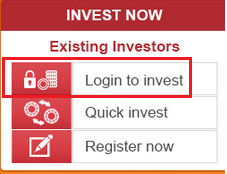
1. Open ICICI Prudential Mutual Fund website and click on below Login to invest link:-
ICICI Prudential MF-Login Page
2. Login to the Pru Tracker website by providing your Username and Password.

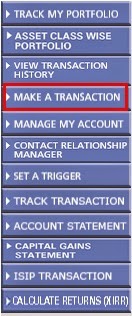
3. In the next page, click on MAKE A TRANSACTION as shown below:-
ICICI MF Online Purchase
4. Select your Folio No. and click on STP button.
ICICI Prudential MF - Register STP
Click to enlarge ICICI Prudential MF-Register STP


5. Fill all the details for your STP registration, as shown below and click on SUBMIT button.
Click to enlarge ICICI Prudential MF - Register STP
6. Confirm the details :-
ICICI Prudential MF - Register STP
7. After successful STP registration, you can see below message from ICICI MF.
ICICI Prudential MF - Register STP
Congratulations on your successful online STP registration of ICICI Mutual Fund :-)

Images Courtesy: ICICI Prudential Mutual Fund

Also read:

More Articles on Mutual Funds


 Please share this article over social networks. For more Learning, Please visit "At A Glance" Section.