Payment Transfer using RTGS - How to Add Beneficiary using HDFC NetBanking?

Finance Guru Speaks: This article will provide you information on how you can add a beneficiary for the purpose of payment transfer to other banks through RTGS using HDFC NetBanking facility.

Steps to follow to add beneficiary for payment transfer to other bank accounts through RTGS:


1. Login to HDFC  NetBanking Account with your Username/Password.
HDFC NetBanking Login

2. Once the page is opened, go to Funds Transfer section as shown below :

HDFC NetBanking Funds Transfer
Click to enlarge - HDFC NetBanking Funds Transfer

3. Under Funds Transfer -> Request section, click on Add a Beneficiary link :
Add a Beneficiary in HDFC
Click to enlarge - Add a Beneficiary in HDFC

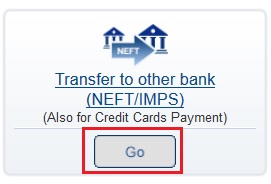
4. In the next page, click on Transfer to other bank link as shown below :
Select RTGS Transaction Type
Click to enlarge - Select Transaction Type

IMPS - How to Transfer Funds Using HDFC NetBanking?

Finance Guru Speaks: This article will provide you information on how you can transfer your funds or money to other banks through IMPS using HDFC NetBanking facility. For making an IMPS Funds Transfer, you need to first add IMPS Payment receiving Beneficiary in your NetBanking account.

Read article - Payment Transfer using IMPS - How to Add Beneficiary using HDFC NetBanking? to know about how to add a Beneficiary for IMPS Payment Transfer in HDFC.


Once you added the IMPS beneficiary, you need to follow below steps to transfer the funds.


Steps to follow to transfer funds or money to other bank accounts through IMPS :


1. Login to HDFC  NetBanking Account with your Username/Password.
HDFC NetBanking Login
2. Once the page is opened, go to Funds Transfer section as shown below :

HDFC NetBanking Funds Transfer
Click to enlarge - HDFC NetBanking Funds Transfer
3. Click on Go present in Instant Transfer section as shown below :

HDFC Instant Transfer IMPS
Click to enlarge - HDFC Instant Transfer IMPS

Payment Transfer using IMPS - How to Add Beneficiary using HDFC NetBanking?

Finance Guru Speaks: This article will provide you information on how you can add a beneficiary for the purpose of payment transfer to other banks through IMPS using HDFC NetBanking facility.

Steps to follow to add beneficiary for payment transfer to other bank accounts through IMPS :


1. Login to HDFC  NetBanking Account with your Username/Password.
HDFC NetBanking Login

2. Once the page is opened, go to Funds Transfer section as shown below :

HDFC NetBanking Funds Transfer
Click to enlarge - HDFC NetBanking Funds Transfer

3. Under Funds Transfer -> Request section, click on Add a Beneficiary link :
Add a Beneficiary in HDFC
Click to enlarge - Add a Beneficiary in HDFC

4. In the next page, click on Transfer to other bank link as shown below :
Select IMPS Transaction Type
Click to enlarge - Select Transaction Type
5. Now, fill all the details correctly :
Fill Beneficiary Details
Click to enlarge - Fill Beneficiary Details


6. Review the details and Click on Confirm on the next page.

7. For authentication of this operation, click on your Mobile no. as shown below and click Continue:
HDFC Bank Authentication
Click to enlarge - HDFC Bank Authentication

8. Enter the One Time Password received on your Mobile through SMS and click on Continue button :
Enter OTP for Authentication
Click to enlarge - Enter OTP for Authentication


Congratulations!! You have successfully added a Beneficiary for Payment Transfer to other bank accounts through IMPS using HDFC NetBanking.


Images Courtesy: HDFC Bank

  
 Please share this article over social networks. For more Learning, Please visit "At A Glance" Section.

Payment Transfer Within Bank - How to Add Beneficiary using HDFC Net Banking?

Finance Guru Speaks: This article will provide you information on how you can add a beneficiary for the purpose of payment transfer within HDFC Bank accounts using NetBanking facility.

Steps to follow to add beneficiary for payment transfer within HDFC Bank accounts :


1. Login to HDFC  NetBanking Account with your Username/Password.
HDFC NetBanking Login

2. Once the page is opened, go to Funds Transfer section as shown below :

HDFC NetBanking Funds Transfer
Click to enlarge - HDFC NetBanking Funds Transfer

3. Under Funds Transfer -> Request section, click on Add a Beneficiary link :
Add a Beneficiary in HDFC
Click to enlarge - Add a Beneficiary in HDFC
4. In the next page, click on Transfer within the bank link as shown below :
Select Transaction Type of Beneficiary in HDFC
Click to enlarge - Select Transaction Type

5. Now, fill all the details correctly :
Fill Beneficiary Details
Click to enlarge - Fill Beneficiary Details

6. Review the details and Click on Confirm on the next page.

7. For authentication of this operation, select your registered Mobile no. as shown below and click Continue
HDFC Bank Authentication using OTP
Click to enlarge - HDFC Bank Authentication

8. Enter the One Time Password received on your Mobile through SMS and click on Continue button :
Enter OTP for Authentication
Click to enlarge - Enter OTP for Authentication


Congratulations!! You have successfully added a Beneficiary for Payment Transfer within HDFC Bank Accounts.

Images Courtesy: HDFC Bank


 Please share this article over social networks. For more Learning, Please visit "At A Glance" Section.

Payment Transfer using NEFT - How to Add Beneficiary using HDFC Net Banking?

Finance Guru Speaks: This article will provide you information on how you can add a beneficiary for the purpose of payment transfer to Other Banks through NEFT using HDFC NetBanking facility.

Steps to follow to add beneficiary for payment transfer to other bank accounts through NEFT :


1. Login to HDFC  Internet Banking Account with your Username/Password.
HDFC NetBanking Login

2. Once the page is opened, go to Funds Transfer section as shown below :

HDFC NetBanking Funds Transfer
Click to enlarge - HDFC NetBanking Funds Transfer

3. Under Funds Transfer -> Request section, click on Add a Beneficiary link :
Add a Beneficiary in HDFC for NEFT Payments
Click to enlarge - Add a Beneficiary in HDFC

4. In the next page, click on Transfer to other bank link as shown below :
Select Transaction Type
Click to enlarge - Select Transaction Type
5. Now, fill all the details correctly :
Fill Beneficiary Details for NEFT Payment Transfer
Click to enlarge - Fill Beneficiary Details

6. Review the details and Click on Confirm on the next page.

7. For authentication of this operation, click on your Mobile no. as shown below and click Continue
HDFC Bank Authentication
Click to enlarge - HDFC Bank Authentication

8. Enter the One Time Password received on your Mobile through SMS and click on Continue button :
Enter OTP for Authentication
Click to enlarge - Enter OTP for Authentication


Congratulations!! You have successfully added a Beneficiary for Payment Transfer to other bank accounts through NEFT using HDFC NetBanking.


Images Courtesy: HDFC Bank
  

 Please share this article over social networks. For more Learning, Please visit "At A Glance" Section.