How To Online Close or Cancel RD Account In Kotak Mahindra Bank?


Finance Guru Speaks:  This article will provide details on how you can online close or cancel your RD (Recurring Deposit) account through Kotak Mahindra Bank Internet Banking.


Follow below steps to close or cancel your RD account through Kotak Mahindra Bank Online Banking:-


1. Open Kotak Mahindra Bank Online Banking Website.
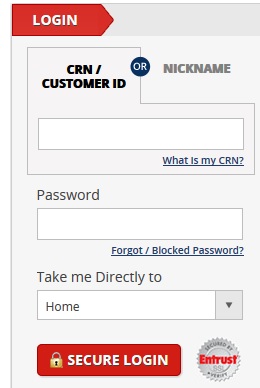
Kotak Mahindra Bank Login Page
2. Provide your login details like CRN (Customer Relationship Number) and Password. Click on SECURE LOGIN button.

3. On the next page, provide the generated OTP. It will be sent to your registered Email ID and Mobile Number. Click on SECURE LOGIN:-
Kotak Mahindra Bank Login
4. Once the Home Page gets opened, go to Banking -> Deposits -> Deposit Summary link as shown below.
Kotak Mahindra Bank - Close RD Account
5. Once the page opens, select Recurring Deposit and action as Premature Withdrawal of Deposit. Click on GO button:-


Download Re-KYC Form For Kotak Mahindra Bank


Finance Guru Speaks: This article will provide Re-KYC Form for Kotak Mahindra Bank. As per directives from RBI, it is mandatory for Banks to seek and update Know Your Customer (KYC) details of customers periodically in their records.
Kotak Mahindra Bank KYC
Bank Account Holders are requested to submit the enclosed self-certified declaration (which is attached in this article) along with the following documents:  
  • Self-attested copy of identity proof document
  • Self-attested copy of address proof document
  • Latest photograph


Click the link to download: KOTAK BANK Re-KYC FORM

Note: Bank will send emails to customers pending for Re-KYC procedure. You can submit this duly-filled Re-KYC form along with the above-mentioned documents to any of the Bank branches or via Post/Courier.

Also read:

More Articles on Kotak Mahindra Bank

Image Courtesy: Kotak Mahindra Bank website

How To Link Aadhaar Number with Kotak Mahindra Bank Using SMS?


Finance Guru Speaks: This article will provide details on how you can link your Aadhaar No. with Kotak Mahindra Bank using SMS.

Also Read:


Below are the steps for Aadhaar seeding with Kotak Mahindra Bank through SMS:-

 1. First you need to register your Mobile No. with your Bank. You can approach to branch and get your Mobile No. registered.

2. Once your Mobile No. gets registered, you need to send SMS to 5676788 in the following format :-


AADHAAR <space><12 DIGIT AADHAAR><space><CRN>
Aadhaar linking with Kotak Mahindra Bank
Let's say your Aadhar No. is 123456789000 and your CRN (Customer Relationship No.) is 112233. So you need to send SMS to 5676788 as -

AADHAAR 123456789000 112233

You can find CRN (Customer Relationship No.) is mentioned on your Debit Card / Cheque book or any other communication you would have received from the bank.

3. You will get SMS confirmation of Aadhar seeding request.

4. The Aadhaar number will be verified by Bank with UIDAI. If the verification is failed, you can contact the branch along with Aadhaar number or e-aadhaar.

Congratulations!! You have linked your Aadhaar Number with your Kotak Mahindra Bank through SMS.

Please note :-

- On submitting, your request for seeding Aadhaar Number into your account with the Bank will be processed, basis the validation with NPCI / requisite authorities.

- This request will not be processed if details in Bank Account do not match with details available with UIDAI.

- The Bank is not responsible for any erroneous updation of Aadhaar Number in your account.

- Please do not submit parallel requests for Aadhaar seeding using more than one medium. If you have already submitted your request for Aadhaar Card linking either with Aadhaar linking form at bank branch / SMS Banking / Netbanking, please wait for the failure message before again submitting your request through any of these mediums.


 Images Courtesy: Kotak Mahindra Bank and UIDAI Websites

6 Easy Steps To Register Mutual Funds SIP In Kotak Mahindra Bank


Finance Guru Speaks: Nowadays almost all the Mutual Fund Houses are giving Online options to invest directly in mutual funds through SIP from their Websites. Once you place the request for SIP investment, fund houses share URN (Unique Registration No.) with you which needs to be added in your registered Bank website so that SIP amount gets auto-deducting from the Bank account.

This article will provide you information on how you can register for Mutual Fund SIP in your Kotak Mahindra Bank account through Internet Banking facility. We will be using Bill Pay facility present in the Internet banking for our SIP deductions.

As an example, we have taken SIP amount of Rs 3000 in ICICI Prudential Mutual Fund and would be registering for SIP deduction. You can choose any Mutual Fund house for SIP and follow the below Steps if the fund house allows Kotak bank for SIP registration.


Steps to follow to start Mutual Fund SIP Auto-Payment using Kotak Mahindra Internet Banking:-


1. Open Kotak Mahindra Bank Online Banking Website. Provide your login details like CRN (Customer Relationship Number) and Password. 
Kotak Mahindra Bank Login Page
2. Generate the Dynamic Access Code. It will be send to your registered Email ID and Mobile Number. Provide the Dynamic Access Code and click on SECURE LOGIN.  
Kotak Mahindra Bank - Register Mutual Fund SIP
Generate Dynamic Access Code
3. Once the Home Page gets opened, go to BillPay/Recharge -> My Billers -> Add Biller / Instant Pay link as shown below :-
Kotak Mahindra Bank - Register Mutual Fund SIP
Kotak Mahindra Bank - Add Biller


4. Select Mutual Funds option and Company name as ICICI Prudential Mutual Fund (or any other Fund house name of your wish). Click on Continue :-

Online Banking - How To Link Aadhaar with Kotak Mahindra Bank Account?

Finance Guru Speaks: This article will provide details on how you can link your Aadhaar No. with Kotak Mahindra Bank using Internet Banking.

Below are the steps to link your Aadhaar with Kotak Mahindra Bank Savings Account:-


1.       Login to Kotak Mahindra Internet Banking.
Kotak Mahindra Internet Bank Login Page
2.       In the Home page, click on "Banking" link as shown below :-
Kotak Mahindra Internet Bank - Banking Tab
Kotak Mahindra Bank - Banking Option

2.       In the "QUICK LINKS" section, click on "AADHAAR Seeding" link as shown below :-
Kotak Mahindra Bank - Aadhaar Seeding
2.       Now, fill the details as shown :-
Link Aadhaar to Kotak Mahindra Bank
Click to enlarge - Link Aadhaar to Kotak Mahindra Bank

Congratulations!! You have linked your Aadhaar with Kotak Mahindra Savings Bank Account.


Please note as per Internet Banking site:-

- Aadhaar number can be updated with Saving account only. You can link your Aadhaar number only.

- On clicking the 'Submit' button above, your request for seeding Aadhaar Number into your account with the Bank will be processed, basis the validation with NPCI / requisite authorities.

- This request will not be processed, if details in Bank Account do not match with details available with UIDAI.

- Your request will be processed in 7 working days.

- The Bank is not responsible for any erroneous updation of Aadhaar Number in your account.

- If your Aadhaar number is already seeded in your account with Kotak Mahindra Bank and you wish to change the account, please visit the nearest Kotak Mahindra Branch with your Aadhaar Card.

- Please do not submit parallel requests for Aadhaar seeding using more than one medium. If you have already submitted your request for Aadhaar Card linking either with Aadhaar linking form at bank branch / SMS Banking / Netbanking, please wait for the failure message before again submitting your request through any of these mediums.

Also read:
More Articles on Kotak Mahidra Bank

 
Images Courtesy: Kotak Mahindra India


  Please share this article over social networks. For more Learning, Please visit "At A Glance" Section.

How To Stop Cheque Payment Through Kotak Mahindra Bank Internet Banking?


Finance Guru Speaks: This article will provide you information on how you can request for stopping your Kotak Mahindra Bank Cheque payment through Internet Banking facility.

First of all, why would someone issue a Cheque and then want to cancel the payment request?

Some of the common reasons are:-
  1. The respective issued Cheque got lost in courier/post.
  2. Issued Cheque got stolen.
  3. You want to reissue a new Cheque because of some reasons.
  4. You have already paid the receiving party in Cash.
  5. The Cheque was issued with some errors.

Steps to follow to stop Cheque Payment using Kotak Mahindra Bank Internet Banking:-


1. Open Kotak Mahindra Bank Online Banking Website. Provide your login details like CRN (Customer Relationship Number) and Password. 
Kotak Mahindra Bank Login Page
2. Generate the Dynamic Access Code. It will be send to your registered Email ID and Mobile Number.Provide the Dynamic Access Code and click on SECURE LOGIN.  
Kotak Mahindra Bank Stop Cheque Payment
Generate Dynamic Access Code
3. Once the Home Page gets opened, go to Banking -> Service Requests -> New Service Request link as shown below:-
Kotak Mahindra Bank Stop Cheque Payment
Banking Features
4. Click on Stop Cheque(s) link as shown below:- 
Kotak Mahindra Bank Stop Cheque Payment
Stop Cheque Option
5. Fill the details as shown below:-  

Kotak Mahindra Bank Stop Cheque Payment
Click to enlarge - Stop Cheque Request
-          First select the Account number.

-          As seen above, you need to provide the Start Cheque Number and End Cheque Number. Suppose you have to cancel payments issued via 3 Cheques: 000121,000122 & 000123, then you can give "Start Cheque Number=000121" and "End Cheque Number = 000123".

-          If you want to cancel only one Cheque Payment, then enter that Cheque Number in the "Start Cheque Number" field and leave "End Cheque Number" as Blank.

-          Click on Stop Cheque button.

-         Confirm the request.

This is how you can cancel the payment request of an issued Cheque.

Please note as per Internet Banking site:-

Stop Payment instruction once given cannot be withdrawn. The cheque numbers mentioned should belong to the same cheque book.
 

Also Read:


Images Courtesy: Kotak Mahindra Bank Website 

How To Open Term Deposit (TD) Account in Kotak Mahindra Bank Using Internet Banking?

Finance Guru Speaks: This article will show you how you can open Term Deposit (TD) in Kotak Mahindra Bank using Online or Internet Banking.

You can follow below steps to open the TD in Kotak Mahindra Bank through Internet banking:-


  1. Open Kotak Mahindra Bank Online Banking Website.
    Kotak Mahindra Bank Login Page
    Kotak Mahindra Bank Login Page
  2. Provide your login details like CRN (Customer Relationship Number) and Password. Click on SECURE LOGIN button. 
  3. In the next page, generate the Dynamic Access Code. It will be send to your registered Email ID and Mobile Number.
    Kotak Mahindra Bank Dynamic Access Code Generation Page
    Dynamic Access Code Generation Page
  4. Provide the Dynamic Access Code and click on SECURE LOGIN.
  5. Once the Home Page gets opened, go to Banking -> Deposits -> Open A Term / Recurring Deposit link as shown below.
    Kotak Mahindra Bank TD Account
    Click to enlarge - Kotak Mahindra Bank TD Account
  6. Select Deposit Type as Term Deposit and fill all the details as shown below.
    Kotak Mahindra Bank TD Details
    Click to enlarge - Term Deposit Details
  7. Once done, click on Submit button.

Congratulations!! You have successfully opened TD account using Online Banking facility in Kotak Mahindra Bank.

Also read:
More Articles on Kotak Mahidra Bank

 
Images Courtesy: Kotak Mahindra India


  Please share this article over social networks. For more Learning, Please visit "At A Glance" Section.

How To Open Recurring Deposit (RD) Account in Kotak Mahindra Bank Using Internet Banking?


Finance Guru Speaks: This article will show you how you can open Recurring Deposit (RD) in Kotak Mahindra Bank using Online or Internet Banking.

You can follow below steps to open the RD in Kotak Mahindra Bank through Internet banking:-


  1. Open Kotak Mahindra Bank Online Banking Website.
    Kotak Mahindra Bank Login Page
    Kotak Mahindra Bank Login Page
  2. Provide your login details like CRN (Customer Relationship Number) and Password. Click on SECURE LOGIN button.
  3. On the next page, generate the Dynamic Access Code. It will be sent to your registered Email ID and Mobile Number.
    Dynamic Access Code Generation Page
    Dynamic Access Code Generation Page
  4. Provide the Dynamic Access Code and click on SECURE LOGIN.
  5. Once the Home Page gets opened, go to Banking -> Deposits -> Open A Term / Recurring Deposit link as shown below.
  6. Kotak Mahindra Bank RD Account
    Kotak Mahindra Bank RD Account
  7. Select Deposit Type as Recurring Deposit and fill all the details as shown below.
    Kotak Mahindra Bank Recurring Deposit Details Page
    Click to enlarge - Recurring Deposit Details Page
  8. Once done, click on Submit button.

Congratulations!! You have successfully opened RD account using Online Banking facility in Kotak Mahindra Bank. 
 

How To Order Cheque Books Online In Kotak Mahindra Bank Using Internet Banking?

Finance Guru Speaks: This article will show how you can order Cheque Books in Kotak Mahindra Bank using Online or Internet Banking facility.

Follow below steps to order Cheque Books Online In Kotak Mahindra Bank:-


  1. Open Kotak Mahindra Bank Online Banking Website. Provide your login details like CRN (Customer Relationship Number) and Password.
Kotak Mahindra Bank Login Page

2. Generate the Dynamic Access Code. It will be send to your registered Email ID and Mobile Number.Provide the Dynamic Access Code and click on SECURE LOGIN
Generate Kotak Dynamic Access Code
Generate Dynamic Access Code

3. Once the Home Page gets opened, go to Banking -> Service Requests -> New Service Request link as shown below:-

What Are The Documents Required To Open Savings Bank Account?


Finance Guru Speaks: This article provides you a document checklist used to open a Savings Bank Account in any Indian Bank.

You can use it for your reference or share it with your contacts.

Documents Required To Open Savings Bank Account:-


Documents required to open Savings Bank Account
Savings Bank Account Document Checklist

NOTE: Aadhaar Card is also a very important document in opening a Bank account.