Finance Guru Speaks: Do you want to register
STP (Systematic Transfer Plan) and transfer your units or amount from one Mutual Fund to another in
DSP Mutual Fund House?
If you have a lump-sum investment in Fund X, by using STP you can systematically transfer a defined amount (Say Rs. 5000 per month) in Fund Y. Remember both the funds X & Y should be from the same fund house.
Many investors are using STP route to systematically transfer the amount from Debt Mutual Fund to Equity Mutual Fund or vice versa.
Inorder to register online for STP, you should be an existing DSP MF investor and get registered to its
DSP Mutual Fund website to avail Username and Password by clicking on
Create your account link.
Steps to Register Online STP in DSP Mutual Fund:-
1. Open
DSP Mutual Fund website and click on
Log In after providing your registered Username and Password:-
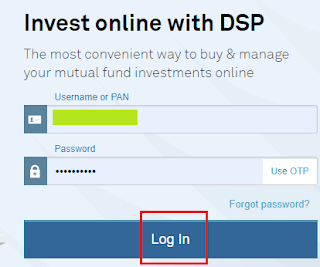 |
| DSP MF- Login Page |
2. In the Home Page, click on
New transaction -> Start STP as shown below:-
 |
| DSP MF - Start STP |
3. Select your
Source Fund and
Target Fund. Select Plan as
Direct.
 |
| Click to enlarge - DSP MF - Start STP |
4. Fill all the details like
STP Amount,
Tenure,
STP Frequency,
1st STP installment date etc. as shown below and click on
Review STP button.
 |
| Click to enlarge - DSP MF - Start STP |
5. Confirm the details:-
 |
| DSP MF - Start STP |
Congratulations on your successful online STP registration of DSP Mutual Fund :-)
Please help to like, share and comment on this article over your Social Networks. Thanks.
Images Courtesy: DSP Mutual Fund Website
Also read:


