How To Buy Direct Mutual Funds in Zerodha Coin?


Finance Guru Speaks: This article will guide you on how to Buy Mutual Funds in Zerodha Coin.

How To Buy Mutual Funds in Zerodha Coin


As per the Website- Zerodha Coin is India's largest direct mutual fund platform that lets you buy direct mutual funds online with no commission passback, directly from asset management companies.

Zerodha, as a Trading and Demat Account, has gained very wide popularity because of very low-cost trading and ease of use. If you don't have the Zerodha account, then you can open it through this
LINK. It is very easy to open a Demat Account in Zerodha.

Steps to Buy Mutual Funds in Zerodha Coin:-


1. Login to Coin by Website or Mobile App. In this article, we have purchased Mutual Funds via Coin Android App through Smartphone.
How To Buy Direct Mutual Funds in Zerodha Coin
How To Buy Mutual Funds in Zerodha Coin
2. On the Home Page, go to the Explore Section to search your desired Mutual Fund to be purchased, as shown below:-
How To Buy Mutual Funds in Zerodha Coin
Click to enlarge - How To Buy Mutual Funds in Zerodha Coin

3. On the Next Screen, start typing the Mutual Fund name. As an example, we are buying Axis Liquid Fund - Growth option - Direct Plan. The steps mentioned can be applied to all other Mutual Funds as well.
Click on the Fund Name as shown below:-

How To Buy Mutual Funds in Zerodha Coin
Click to enlarge - How To Buy Mutual Funds in Zerodha Coin
4. On the Next Screen, click on the Buy button:-
How To Buy Mutual Funds in Zerodha Coin
Click to enlarge - How To Buy Mutual Funds in Zerodha Coin

5. On the Next Screen, enter your investment amount in the multiple of INR500 (Example - 10000, 5500, etc.) and again click on the Buy button:-

How To Online Change Email Address In Axis Mutual Fund?


Finance Guru Speaks: This article will guide you on how to change or update your Email ID online in Axis Mutual Fund.

How To Update Email ID In Axis Mutual Fund

Please make sure to register your Mobile No. against your existing Folio to change or update your Email Address online in Axis Mutual Fund.

Steps to online update or change your Email ID in Axis Mutual Fund:-


1. Visit Axis MF Home Page by clicking here.


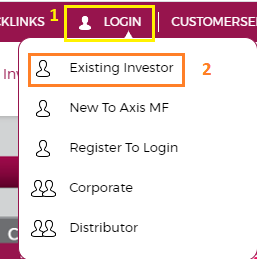
2. As shown below, click on LOGIN -> Existing Investor. 
Axis Mutual Fund - Change Email Address
Note: If you do not have Login details to access the Axis Mutual Fund website, then you can register your existing Folio details by clicking this link - Register to Login


3. Login by using your PAN details (or existing EMail ID) and generating OTP in your registered Mobile No. Click on Login:-
Axis Mutual Fund - Change Email Address
4. In the Home Page, check the top right-hand side of the screen. Click on the Arrow mark and then My Profile, as shown below:-
Axis Mutual Fund - Change Email Address
5. Click on the Pencil Icon against your Existing Email ID. And then enter your New Email Address and click on Save. It is shown as below:-

Axis Mutual Fund - Change Email Address
6. You will receive an OTP on your registered Mobile No. Enter this OTP and click on Confirm:-
Axis Mutual Fund - Change Email Address

Congratulations! You have successfully updated your Email ID in Axis Mutual Fund.
Axis Mutual Fund - Change Email Address

Images Courtesy: Axis Mutual Fund


Please help to like, share and comment on this article over your Social Networks. Thanks.


How To Check Axis Mutual Fund Folio Balance Using Missed Call?


Finance Guru Speaks: This article will provide you detail on how you can receive Axis MF folio balance details on your Mobile by using the Missed Call feature.

Axis Mutual Fund - Check Account balance by Missed Call

To avail this feature, you need to be an existing Axi MF investor and your Mobile No. should be registered in your Folio Account.

This is how you can receive Axis MF Folio balance using Missed Call :-


Through your registered mobile no. , just give a missed call to 09212010033 to get your folio detail.


Once you give a missed call, you will receive SMS showing your current folio valuation.

Congratulations on receiving your Axis Mutual Fund folio details using Missed call. 👍

Please help to like, share and comment on this article over your Social Networks. Thanks.

Images Courtesy: Axis Mutual Fund
Also read:

How To Get Axis Mutual Fund Account Statement Online?


Finance Guru Speaks:  This article will provide you steps on how you can generate your Axis Mutual Fund  Account statement online, considering the fact that you are an existing investor of this Fund house.


The only thing required is to have a valid email ID registered against your Axis Mutual Fund Account. You can register your Email ID at the time of Mutual Fund purchase from this Fund house.

If your Email ID is not registered, then kindly visit Axis MF branches or their Registrar Karvy office to register it.

Here is how you can generate or get your Axis Mutual Fund Account Statement Online:-


1. Visit Axis Home Page by clicking here.

2. As shown below, Click ACCOUNT STATEMENTS link present under INVEST WITH US link :-
Axis Mutual Fund Account Statement
3. In the Next Page, provide either your Folio No. or PAN No. in the Account Statement Section and click on SUBMIT button :-
Axis Mutual Fund Account Statement


4. You will receive confirmation pop-up message as :-
Axis Mutual Fund Account Statement
Congratulations! You have successfully generated your Axis Mutual Fund Account Statement online and you will receive it on your registered Email box.

Axis Mutual Fund Account Statement
Click to enlarge - Axis Mutual Fund Account Statement
Please help to like, share and comment on this article over your Social Networks. Thanks.
Also Read:

More Articles About Mutual Funds


Images Courtesy: Axis Mutual Fund Website