How To Online Purchase NFO - Motilal Oswal MSCI EAFE Top 100 Select Index Fund


Finance Guru Speaks: This article will guide you on how you can invest in NFO (New Fund Offer) from Motilal Oswal Mutual Fund - Motilal Oswal MSCI EAFE Top 100 Index Fund

Last Date for this NFO Offer is 25th Nov 2021.

How To Invest In NFO Motilal Oswal MSCI EAFE Top 100 Select Index Fund

Some details about this NFO: 

How To Invest In NFO - Motilal Oswal MSCI EAFE Top 100 Select Index Fund

Through this fund, you can take exposure to renowned brands across different sectors of Countries like - UK, Japan, France, Switzerland, Germany, etc. 

Some of the Popular brands as per the Fund house website:
How To Invest In NFO - Motilal Oswal MSCI EAFE Top 100 Select Index Fund

You can go through the link to know more about this NFO.

Make sure you have your Mobile No. and Email ID correctly registered in the fund house. 


Steps to Online Buy NFO - Motilal Oswal MSCI EAFE Top 100 Select Index Fund:-


1. Open Motilal Oswal Mutual Fund home page after clicking here and click on MF INVESTOR -> EXISTING INVESTOR button. If you don't have any existing Folio/Investment with Motilal Oswal Fund, then you can click on NEW INVESTOR button.

2. Provide your PAN No. and click on GENERATE OTP button.
Motilal Oswal Mutual Fund - Login
Motilal Oswal Mutual Fund - Login

3. OTP will be received on your registered Mobile No. and Email ID. Enter the OTP and click on Submit button as shown below:-
Motilal Oswal Mutual Fund - Login
Motilal Oswal Mutual Fund - Login
4. On the Home Page, click on QUICK INVEST -> PURCHASE, as shown below:-
How To Invest In NFO Motilal Oswal MSCI EAFE Top 100 Select Index Fund
Click to enlarge - How To Invest In NFO Motilal Oswal MSCI EAFE Top 100 Select Index Fund
5. On the Next screen, Enter your Investment Amount and click on ADD TO CART button. Make sure the Fund Name is correctly reflected as Motilal Oswal MSCI EAFE Top 100 Select Index Fund:-
How To Invest In NFO Motilal Oswal MSCI EAFE Top 100 Select Index Fund
Click to enlarge - How To Invest In NFO Motilal Oswal MSCI EAFE Top 100 Select Index Fund

How To Invest In NFO Motilal Oswal MSCI EAFE Top 100 Select Index Fund
Click to enlarge - How To Invest In NFO Motilal Oswal MSCI EAFE Top 100 Select Index Fund
6. Once you click, you will get below screen wherein you need to proceed for Payment:-
How To Invest In NFO Motilal Oswal MSCI EAFE Top 100 Select Index Fund
Click to enlarge - How To Invest In NFO Motilal Oswal MSCI EAFE Top 100 Select Index Fund

Cross-check your existing Folio Details (or create New Folio if you need), Bank Details, and Mode should be Direct. Click on CONTINUE TO PAYMENT button:-
How To Invest In NFO Motilal Oswal MSCI EAFE Top 100 Select Index Fund
Click to enlarge - How To Invest In NFO Motilal Oswal MSCI EAFE Top 100 Select Index Fund

7. It will redirect to your selected Bank's Fund transfer website. Make the payment through Bank's Internet Banking method.

Congratulations on your successful online NFO Purchase of Motilal Oswal MSCI EAFE Top 100 Select Index Fund.
How To Invest In NFO Motilal Oswal MSCI EAFE Top 100 Select Index Fund
Click to enlarge - How To Invest In NFO Motilal Oswal MSCI EAFE Top 100 Select Index Fund


Images Courtesy: Motilal Oswal Mutual Fund Website

Also read:

More Articles on Motilal Oswal Mutual Fund

Please help to share the article over your social network.

How To Buy GOLDBEES Gold ETF in Zerodha?


Finance Guru Speaks: This article will guide you on how to Buy GOLDBEES (Gold ETF) in Zerodha.


Zerodha, as a Trading and Demat Account, has gained very wide popularity because of very low-cost trading and ease of use. If you don't have the Zerodha account, then you can open it through this LINK. It is very easy to open a Demat Account in Zerodha.

Please read the complete article. I have shared the relationship between Stock Market (Nifty) and Gold Prices. Please comment, share, and like this article for constant encouragement.

To begin with, buying Gold ETF means buying Gold in Demat form. It can be sold later on the NSE or BSE Stock Exchange. Gold is used for Hedging your Portfolio and it provides the necessary diversification.

Steps to Buy GOLDBEES Gold ETF in Zerodha:-


1. Login to Zerodha after clicking here. Provide your User ID, Password, and then your assigned PIN to Login.
Zerodha Login
Zerodha Login
Zerodha Login Screen
Zerodha Login
2. On the Home Page, go to the Watchlist on the left-hand side and Search with the keyword GOLDBEES to buy the Nippon India Gold ETF which is also known as GOLDBEES, and click on B button. You can select any exchange (NSE or BSE) for buying. :-

How To Buy GOLDBEES Gold ETF in Zerodha

3. On the Next Screen, fill in Buy Order details as shown below. To keep it simple, we are buying 1000 units of GOLDBEES at a buying price of INR 41.10.

With INR 41.10 as your Buy Price, you need to pay a Total Amount of 1000x41.10 = INR 41,000 to the Seller.

It is a positional order, meaning we are not buying this Call Option for Intraday Trading. It is mainly for investment purposes. 

Once you fill in all the details, click on Buy button:-
How To Buy GOLDBEES Gold ETF in Zerodha
Click to enlarge - How To Buy GOLDBEES Gold ETF in Zerodha


4. Once you click Buy, your Buy order gets placed in the Exchange.

Congratulations! You have successfully placed Buy Order for GOLDBEES. You can cross-check your newly created Order from Orders -> Orders list. This Order gets executed as soon as Exchange finds a Seller at your requested Price.

Sharing relationship between Stock Exchange and Gold Prices:-


In a theoretical manner, there is an inverse relationship between Gold and Stock Exchange. When Nifty or Sensex goes up, the prices of Gold go down or stay in a tight range.

Whereas when the Market crashes, investors tend to invest more in Gold for safety and diversification. Gold is used for hedging purposes and provides stability to the portfolio.

The below chart shows the Price Movements of Nifty and GOLDBEES on a Monthly chart. It is clearly evident that both move normally in the opposite direction.

Stock Market and Gold Prices Relationship
Click to enlarge - Stock Market and Gold Prices Relationship

However, due to more and more awareness regarding investments and diversifications, Indian Investors keep on buying Gold ETFs on a regular basis via SIP mode. 

To buy GOLDBEES at low prices, keep investing a small amount whenever Nifty goes up by 200 to 300 points. This way, you will accumulate Gold at cheaper prices. And, when Nifty crashes or gets into a bearish mode, you can start booking profits by selling your GOLDBEES units.

Also Read:

Please help to like, share, and comment on this article over your Social Networks. Thanks.


Images Courtesy: Zerodha Website

How To Buy Direct Mutual Funds in Zerodha Coin?


Finance Guru Speaks: This article will guide you on how to Buy Mutual Funds in Zerodha Coin.

How To Buy Mutual Funds in Zerodha Coin


As per the Website- Zerodha Coin is India's largest direct mutual fund platform that lets you buy direct mutual funds online with no commission passback, directly from asset management companies.

Zerodha, as a Trading and Demat Account, has gained very wide popularity because of very low-cost trading and ease of use. If you don't have the Zerodha account, then you can open it through this
LINK. It is very easy to open a Demat Account in Zerodha.

Steps to Buy Mutual Funds in Zerodha Coin:-


1. Login to Coin by Website or Mobile App. In this article, we have purchased Mutual Funds via Coin Android App through Smartphone.
How To Buy Direct Mutual Funds in Zerodha Coin
How To Buy Mutual Funds in Zerodha Coin
2. On the Home Page, go to the Explore Section to search your desired Mutual Fund to be purchased, as shown below:-
How To Buy Mutual Funds in Zerodha Coin
Click to enlarge - How To Buy Mutual Funds in Zerodha Coin

3. On the Next Screen, start typing the Mutual Fund name. As an example, we are buying Axis Liquid Fund - Growth option - Direct Plan. The steps mentioned can be applied to all other Mutual Funds as well.
Click on the Fund Name as shown below:-

How To Buy Mutual Funds in Zerodha Coin
Click to enlarge - How To Buy Mutual Funds in Zerodha Coin
4. On the Next Screen, click on the Buy button:-
How To Buy Mutual Funds in Zerodha Coin
Click to enlarge - How To Buy Mutual Funds in Zerodha Coin

5. On the Next Screen, enter your investment amount in the multiple of INR500 (Example - 10000, 5500, etc.) and again click on the Buy button:-

How Buying Bad News and Selling Good News Can Keep You Out of Trouble In Stock Market


Finance Guru Speaks: This article will highlight the importance of a very important concept to remain profitable in the Stock Market - Buy on Bad News and Sell on Good News!


Buy on Bad News and Sell on Good News


Share Markets are generally driven by 3 factors - Fundamental, Technical & News. Out of which, the News factor is the most powerful one amongst Fundamental or Technical factors. Whenever there is News or Rumors, it creates a strong sentiment in the Market.

If you are a Trader or an Investor in the Share Market, then you would definitely have experienced this aspect.


So, coming back to the article topic -

How Buying Bad News and Selling Good News Can Keep You Out of Trouble In Stock Market?


Markets around the world are driven by two strong emotions - Greed and Fear.

You might have heard the saying - Be Greedy when Others are Fearful; Be Fearful when Others are Greedy.

Sell on Good News: 

During a strong Bull Market, you can witness good news from all corners. You open any Newspaper, News channels, YouTube channels, etc., you can hear "Experts" advising more buying because of "Good News" around you. As per them, this Bull Run is never-ending and earning from the Market is damn easy. You just buy a Stock or Index in the morning and by end of the day, you will get handsome returns because of the appreciation in the price. 

Is earning in the Stock Market so easy?

Strong Players like Operators make the best use of this situation. When Retailers or Weak players are buying on Good News due to their greed, they slowly start distributing their positions. In other words, when you or I am buying enthusiastically, Operators are quietly selling us at high price levels.

Once the distribution by Operators is over at the high price levels, the market falls down rapidly without giving any chance to Retailers to exit their positions. This results in a huge loss to them and they get stuck at a higher price level in the false hope or anticipation of another bull run in that stock or index. Sometimes this wait can go on for months to years!

Also, during this "Good News" era, you can also observe so many IPOs floated in the market. Poor Retailers get lured by the dream of earning quick money and invest in costly IPOs without studying the fundamentals or future potential of the Company.

The solution to the above problems - Sell on Good News.

In order to avoid this trap, you should think and behave like the Operators. 

You can follow - 

- If you already have such Stocks in your portfolio, then you can start selling them in small quantities on every price rise because of "Good News". Do not be greedy and keep on holding them forever. Your idea should be to generate decent profits from the Stocks instead of marrying it for life.

- If you do not have Stocks, then check whether the current price levels are already in the Overbought zone. You can use Technical indicators like RSI or Stochastic to find out whether the current value is more than 70 or 80. In a strong bull market, the value can cross above 80 as well & remain there for quite some time, however, it gives an indication to be more cautious in buying new positions.

- You can also check for bearish divergence in the Price and Technical Indicators like RSI. If Price is making Higher Highs and Higher Lows, but RSI makes Lower Highs and Lower Lows, then it gives a strong indication of the end of Uptrend.


Avoid Fear and Greed in Stock Market

Buy on Bad News: 

During a strong Bear Market, you can witness bad news from all corners. Every expert around will advise you to Sell and run away from the Market. As per them, this is the end of the World and the economy is doomed and cannot be recovered. 

How To Buy PUT Options in Zerodha?


Finance Guru Speaks: This article will guide you on how to Buy Put (PE) Options in Zerodha.

How To Buy Put Options in Zerodha

Zerodha, as a Trading and Demat Account, has gained very wide popularity because of very low-cost trading and ease of use. If you don't have the Zerodha account, then you can open it through this LINK. It is very easy to open a Demat Account in Zerodha.

Please read the complete article. I have shared 6 Tips at the end of the Article. Please comment, share, and like this article for constant encouragement.

To begin with, buying Put Option is also known as LONG Put position. In India, we denote Put Option as PE (Put European).

Steps to Buying Put Options in Zerodha:-


1. Login to Zerodha after clicking here. Provide your User ID, Password, and then your assigned PIN to Login.
Zerodha Login
Zerodha Login
Zerodha Login Screen
Zerodha Login
2. On the Home Page, go to the Watchlist on the left-hand side and Search the required Put Strike to buy the PE Option and click on B button. As an example, we are buying NIFTY JUN Series 8500 PE Option as shown below. You can also select any Stock which is open for FnO trading.:-
How To Buy Put Options in Zerodha
How To Buy PUT Options in Zerodha
How To Buy Put Options in Zerodha
How To Buy PUT Options in Zerodha

3. On the Next Screen, fill Buy Order details as shown below. To keep it simple, we are buying 1 LOT (equal to 75 Shares) of NIFTY at a buying price of 40. The last traded price for JUN Series 8500 PE Strike is 50.60.

With INR 40 as your Buy Price, you need to pay a Total Premium of 40x75 = INR 3000 to the Seller.

It is a positional order, meaning we are not buying this Put Option for Intraday Trading. Once you fill all the details, click on Buy button:-

How To Buy CALL Options in Zerodha?


Finance Guru Speaks: This article will guide you on how to Buy Call (CE) Options in Zerodha.

How To Buy Call Options in Zerodha

Zerodha, as a Trading and Demat Account, has gained very wide popularity because of very low-cost trading and ease of use. If you don't have the Zerodha account, then you can open it through this LINK. It is very easy to open a Demat Account in Zerodha.

Please read the complete article. I have shared 6 Tips at the end of the Article. Please comment, share, and like this article for constant encouragement.

To begin with, buying Call Option is also known as LONG Call position. 
In India, we denote Call Option as CE (Call European).

Steps to Buying Call Options in Zerodha:-


1. Login to Zerodha after clicking here. Provide your User ID, Password, and then your assigned PIN to Login.
Zerodha Login
Zerodha Login
Zerodha Login Screen
Zerodha Login
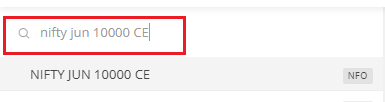
2. On the Home Page, go to the Watchlist on the left-hand side and Search the required Call Strike to buy the CE Option, and click on B button. As an example, we are buying NIFTY JUN Series 10000 CE Option as shown below. You can also select any Stock which is open for FnO trading.:-
How To Buy Call Options in Zerodha
How To Buy CALL Options in Zerodha

How To Buy Call Options in Zerodha
How To Buy CALL Options in Zerodha
3. On the Next Screen, fill in Buy Order details as shown below. To keep it simple, we are buying 1 LOT (equal to 75 Shares) of NIFTY at a buying price of 70. The last traded price for JUN Series 10000 CE Strike is 81.55

With INR 70 as your Buy Price, you need to pay a Total Premium of 70x75 = INR 5250 to the Seller.

It is a positional order, meaning we are not buying this Call Option for Intraday Trading. Once you fill in all the details, click on Buy button:-

How To Place GTT Buy Order in Zerodha?


Finance Guru Speaks: This article will guide you on how to place GTT Buy Order in Zerodha.


How To Place GTT Buy Order in Zerodha

Zerodha, as a Trading and Demat Account, has gained very wide popularity because of very low-cost trading and ease of use. 

If you don't have the Zerodha account, then you can open it through this LINK. It is very easy to open a Demat Account in Zerodha.

Please read the complete article. I have shared two Tips at the end of the Article. Please share and like this article for the constant encouragement.

GTT (Good Till Triggered) Orders for BUY: GTT Order for BUY is used to take the delivery of a Stock based on Trigger Price and Limit Price. Normally, we use GTT so that we don't spend too much time monitoring the prices of Stocks. Buy Orders are automatically placed to Exchange (NSE or BSE) based on our pre-defined price once it is triggered.

Trigger Price - Trigger Price is the price (once hit) where Broker sends the Buy Order to the Exchange.

Limit Price - Limit Price is your actual purchase price where you instruct your broker not to go higher than this price for Buying. So Exchange will settle the Buying at this Price if a Seller is found. And the buyer will get the Delivery on (T+2) day on this buying price.

Remember, as per current rules, GTT Orders remain valid for a Year.


Steps to place GTT Buy Order in Zerodha:-


1. Login to Zerodha after clicking here. Provide your User ID, Password, and then your assigned PIN to Login.
Zerodha Login
Zerodha Login

Zerodha Login Screen
Zerodha Login
2. On the Home Page, Click on the Orders -> GTT -> New GTT as shown below:-
How To Place GTT Buy Order in Zerodha
Click to enlarge - How To Place GTT Buy Order in Zerodha
3. On the Next Screen, start typing the name of the Underlying (Stock). As an example, we are placing GTT BUY order for TCS Shares on the NSE Exchange:-
How To Place GTT Buy Order in Zerodha

myCAMS: How To Purchase and Redeem Mutual Funds Through Your Mobile?


Finance Guru Speaks: This article demonstrates the usefulness of myCAMS mobile application.

With the help of this App, you can have the convenience of purchasing & redeeming mutual funds units as well as getting your Mutual Funds statements through your Smartphone.

You can install myCAMS Mobile App by clicking here (for Android Phones).


Below are the steps which will help you to register to myCAMS and perform various actions like Purchasing & Redeeming your Mutual Funds through your Mobile Phone:-

Once you install the App, open it and register to it by using REGISTER NOW button as shown below:-

myCAMS Register User
myCAMS User Registration
In the next screen, provide your email id (registered email id which you already provided to different mutual funds houses at the time of opening Mutual Fund Accounts)

myCAMS New User Registration
New User is created successfully to access this application and you will receive your password in your mailbox.

myCAMS New User Created
Login to your account using your Email ID (as Username) and recently received Password:-
Login to myCAMS application
myCAMS Login
You can see various options available to you once the application allows you to logged-in.

Since we want to Purchase and Redeem our Mutual Funds Units, please click on Transact as shown below:-


myCAMS Online Facilities

To Purchase Mutual Funds Units:-

Click on Invest More and Select which Mutual Fund House you want to Purchase and fill in other details to complete the Purchase, as shown below:-

Please note that you will be able to perform Purchase or Redeem options only in the Mutual Funds in which you previously invested, having EMAIL ID registered correctly and the Fund Houses have CAMS as their Registrar.


myCAMS - Purchase Mutual Funds
[Click to enlarge] myCAMS - Purchase Mutual Funds

To Redeem Mutual Funds Units:-

Click on Redeem and Select which Mutual Fund House you want to Redeem and fill in other details to complete the Redemption, as shown below:-

Please note that you will be able to perform Purchase or Redeem options only in the Mutual Funds in which you previously invested, having EMAIL ID registered correctly and the Fund Houses have CAMS as their Registrar.

myCAMS - Redeem Mutual Funds
[Click to enlarge] myCAMS - Redeem Mutual Funds
To get Mutual Funds Account Statement Over Mail:-

Click on the Statements option as shown below:-

myCAMS - Generate Account Statement
Fill in the details about which type of Account Statement you want and click on Submit button. Remember the password provided by you in this screen, as with the same password only, you will be able to open the Account Statement Password-protected PDF file which you will receive in your mailbox.

myCAMS - Generate Account Statement

As seen below, you will receive the Consolidated Mutual Fund Statement (in password-protected PDF format) in your registered mail-id.

myCAMS - Generate Account Statement

Images Courtesy: CAMS Mobile App

If you like my work, then you can support me by subscribing to my YouTube Channel - FINANCE guru SPEAKS, and sharing this article over your Social Networks. Thank you. ✌