UPDATED - How To Online Redeem or Sell Canara Robeco Mutual Fund?


Finance Guru Speaks:  This article will provide you *UPDATED* Steps on how you can Online Sell or Redeem Canara Robeco Emerging Equities Fund units. 


The steps mentioned in the old article How To Online Redeem or Sell Canara Robeco Mutual Fund? are no longer valid due to changes in the Mutual Fund website.

The mentioned Steps can be applied to sell any other Mutual Fund from this fund house.

New Steps to follow to Online Redeem or Sell Canara Robeco Mutual Fund Units:-


1. Open Canara Robeco Mutual Fund home page after clicking here

2. Provide your Username and Password and click on SIGN IN button. You need to authenticate using the OTP received on your registered Mobile & Email address:-
Canara Robeco Mutual Fund Login
3. On the Home Page, Click on Transact Here -> Redeem, as shown below. Declare that you are not a US or Canada Resident:-
How To Online Redeem or Sell Canara Robeco Mutual Fund

4.  Select the Folio No. and click on CONTINUE button:-
How To Online Redeem or Sell Canara Robeco Mutual Fund
5. Select Mutual Fund Scheme. In this article, we are selling Canara Robeco Emerging Equities Fund:-
How To Online Redeem or Sell Canara Robeco Mutual Fund
6. Select Redemption Type as "Amount in Rupees" and Enter the Redemption Amount and click on CONTINUE button:-
How To Online Redeem or Sell Canara Robeco Mutual Fund
7. Select your registered Bank where the Redeem Amount will be credited by the Mutual Fund House and click on REVIEW REDEMPTION button:-
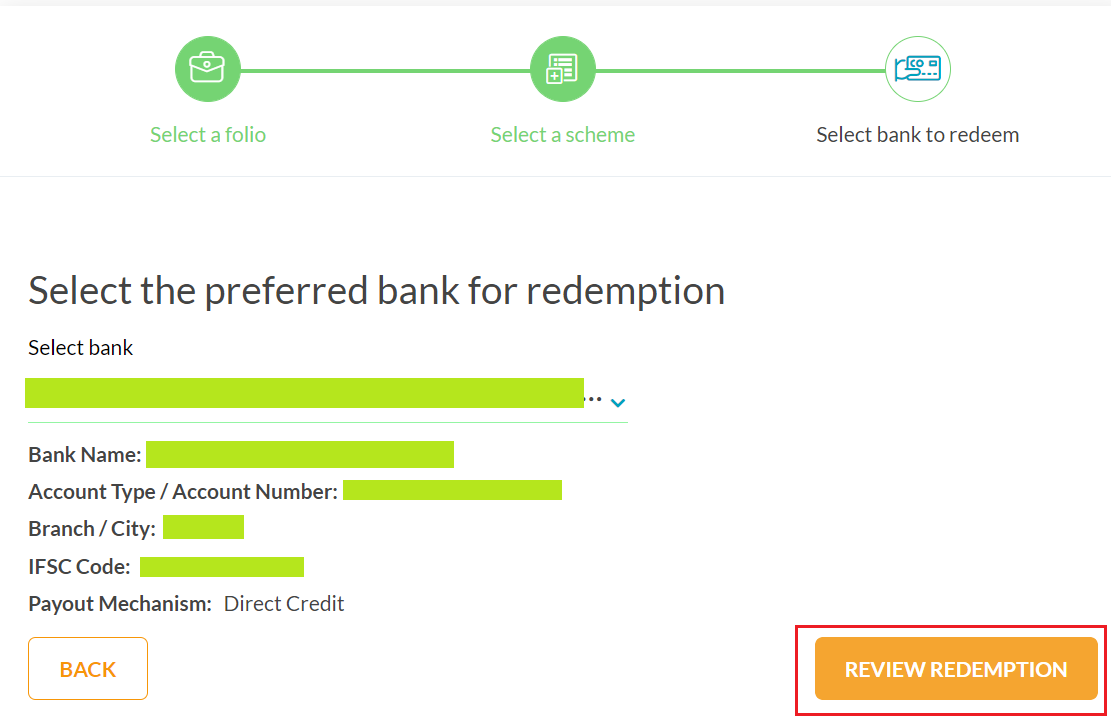
How To Online Redeem or Sell Canara Robeco Mutual Fund
8. Review the Redemption details. Accept Terms & Conditions. Select the radio button of your registered EMail & Mobile No. to get the OTP for verifying this Redemption Transaction. 
How To Online Redeem or Sell Canara Robeco Mutual Fund
9. Once everything is done including OTP Verification, you can click on CONFIRM TRANSACTION button to complete this Redemption Transaction:-
How To Online Redeem or Sell Canara Robeco Mutual Fund

Congratulations on your successful Online Redemption of Canara Robeco Emerging Equities Mutual Fund.

The Mutual Fund amount will be directly credited to your Registered Bank Account.

Images Courtesy: Canara Robeco Mutual Fund Website

How To Create GTT Sell Order in Zerodha?


Finance Guru Speaks: This article will guide you on how to create GTT SELL Order in Zerodha.


How To Place GTT Sell Order in Zerodha


Zerodha, as a Trading and Demat Account, has gained very wide popularity because of very low-cost trading and ease of use. 

If you don't have the Zerodha account, then you can open it through this LINK. It is very easy to open a Demat Account in Zerodha.

Please read the complete article. I have shared two Tips at the end of the Article. Please share and like this article for the constant encouragement.

GTT (Good Till Triggered) Orders for SELL: GTT Order for SELL is used to sell a Stock based on Trigger Price and Limit Price. Normally, we use GTT so that we don't spend too much time monitoring the prices of Stocks. Sell Orders are automatically placed to Exchange (NSE or BSE) based on our pre-defined price once they are triggered.

Trigger Price - Trigger Price is the price where Broker sends the Sell Order (once hit) to the Exchange.

Limit Price - Limit Price is your actual Selling price where you instruct your broker not to go lower than this price for Selling. So Exchange will settle the Selling at this Price if a Buyer is found. And the Seller will get the transaction settled on (T+2) day on this selling price.


Steps to place GTT Sell Order in Zerodha:-


1. Login to Zerodha after clicking here. Provide your User ID, Password, and then your assigned PIN to Login.
Zerodha Login
Zerodha Login

Zerodha Login Screen
Zerodha Login
2. On the Home Page, Click on the Orders -> GTT -> New GTT as shown below:-
How To Place GTT Sell Order in Zerodha
Click to enlarge - How To Place GTT Sell Order in Zerodha

3. On the Next Screen, start typing the name of the Underlying (Stock). As an example, we are placing GTT SELL order for TCS Shares on the NSE Exchange:-
How To Place GTT Sell Order in Zerodha

How To Sell Mutual Funds in Zerodha Coin?


Finance Guru Speaks: This article will guide you on how to Sell Mutual Funds in Zerodha Coin.

How To Sell Mutual Funds in Zerodha Coin

As per the Website- Zerodha Coin is India's largest direct mutual fund platform that lets you buy/sell direct mutual funds online with no commission passback, directly from asset management companies.

Zerodha, as a Trading and Demat Account, has gained very wide popularity because of very low-cost trading and ease of use. If you don't have the Zerodha account, then you can open it through this
LINK. It is very easy to open a Demat Account in Zerodha.

Steps to Sell Mutual Funds in Zerodha Coin:-


In my previous article (link), I have shared the Steps to Buy Direct Mutual Funds in Zerodha Coin. So I assume that you have already purchased Mutual Fund units in your Zerodha Coin account.

1. Login to Coin by Website or Mobile App. In this article, we have sold Mutual Funds via Coin Android App through Smartphone.
How To Sell Mutual Funds in Zerodha Coin
2. On the Home Page, go to the Investments section & click on the Fund Name to sell your desired Mutual Fund, as shown below.
In this article, we are selling ICICI Prudential Liquid Fund. The steps mentioned can be applicable for other Mutual funds as well:-
How To Sell Mutual Funds in Zerodha Coin
click to enlarge - How To Sell Mutual Funds in Zerodha Coin
3. On the Next Screen, click on 3 dots as shown below:- 
How To Sell Mutual Funds in Zerodha Coin
click to enlarge - How To Sell Mutual Funds in Zerodha Coin
4. Now, click on the Redeem button:-
How To Sell Mutual Funds in Zerodha Coin
click to enlarge - How To Sell Mutual Funds in Zerodha Coin
5. On the Next Screen, enter the Mutual Funds Units to be Redeemed (E.g. 200) and click on the Redeem button:-
How To Sell Mutual Funds in Zerodha Coin
click to enlarge - How To Sell Mutual Funds in Zerodha Coin
6. Again click on the Redeem button:-
How To Sell Mutual Funds in Zerodha Coin
click to enlarge - How To Sell Mutual Funds in Zerodha Coin
7. You have to complete this redemption by authorizing it via CDSL (your Demat depository). Click on Continue button:-
How To Sell Mutual Funds in Zerodha Coin
click to enlarge - How To Sell Mutual Funds in Zerodha Coin
8. On the Next Screen, click on Continue to CDSL button:-

How Buying Bad News and Selling Good News Can Keep You Out of Trouble In Stock Market


Finance Guru Speaks: This article will highlight the importance of a very important concept to remain profitable in the Stock Market - Buy on Bad News and Sell on Good News!


Buy on Bad News and Sell on Good News


Share Markets are generally driven by 3 factors - Fundamental, Technical & News. Out of which, the News factor is the most powerful one amongst Fundamental or Technical factors. Whenever there is News or Rumors, it creates a strong sentiment in the Market.

If you are a Trader or an Investor in the Share Market, then you would definitely have experienced this aspect.


So, coming back to the article topic -

How Buying Bad News and Selling Good News Can Keep You Out of Trouble In Stock Market?


Markets around the world are driven by two strong emotions - Greed and Fear.

You might have heard the saying - Be Greedy when Others are Fearful; Be Fearful when Others are Greedy.

Sell on Good News: 

During a strong Bull Market, you can witness good news from all corners. You open any Newspaper, News channels, YouTube channels, etc., you can hear "Experts" advising more buying because of "Good News" around you. As per them, this Bull Run is never-ending and earning from the Market is damn easy. You just buy a Stock or Index in the morning and by end of the day, you will get handsome returns because of the appreciation in the price. 

Is earning in the Stock Market so easy?

Strong Players like Operators make the best use of this situation. When Retailers or Weak players are buying on Good News due to their greed, they slowly start distributing their positions. In other words, when you or I am buying enthusiastically, Operators are quietly selling us at high price levels.

Once the distribution by Operators is over at the high price levels, the market falls down rapidly without giving any chance to Retailers to exit their positions. This results in a huge loss to them and they get stuck at a higher price level in the false hope or anticipation of another bull run in that stock or index. Sometimes this wait can go on for months to years!

Also, during this "Good News" era, you can also observe so many IPOs floated in the market. Poor Retailers get lured by the dream of earning quick money and invest in costly IPOs without studying the fundamentals or future potential of the Company.

The solution to the above problems - Sell on Good News.

In order to avoid this trap, you should think and behave like the Operators. 

You can follow - 

- If you already have such Stocks in your portfolio, then you can start selling them in small quantities on every price rise because of "Good News". Do not be greedy and keep on holding them forever. Your idea should be to generate decent profits from the Stocks instead of marrying it for life.

- If you do not have Stocks, then check whether the current price levels are already in the Overbought zone. You can use Technical indicators like RSI or Stochastic to find out whether the current value is more than 70 or 80. In a strong bull market, the value can cross above 80 as well & remain there for quite some time, however, it gives an indication to be more cautious in buying new positions.

- You can also check for bearish divergence in the Price and Technical Indicators like RSI. If Price is making Higher Highs and Higher Lows, but RSI makes Lower Highs and Lower Lows, then it gives a strong indication of the end of Uptrend.


Avoid Fear and Greed in Stock Market

Buy on Bad News: 

During a strong Bear Market, you can witness bad news from all corners. Every expert around will advise you to Sell and run away from the Market. As per them, this is the end of the World and the economy is doomed and cannot be recovered. 

How To Sell Put Options in Zerodha With Some Tips


Finance Guru Speaks: This article will guide you on how to Sell PUT (PE) Options in Zerodha.

How To Sell Put Options in Zerodha

Zerodha, as a Trading and Demat Account, has gained very wide popularity because of very low-cost trading and ease of use. If you don't have the Zerodha account, then you can open it through this LINK. It is very easy to open a Demat Account in Zerodha.

Please read the complete article. I have shared 6 Tips at the end of the Article. Please comment, share, and like this article for constant encouragement.

To begin with, selling Put Option is also known as SHORT PUT position. In India, we denote Put Option as PE (Put European).


Why and When do you sell Put Option:


You Sell Put Options only when you are sure that the Index or Stock Price (Spot or Underlying Price) will not go below the Strike Price during Expiry, meaning you are moderately Bullish. You will be in gain till the Spot Price remains higher or equal to the Strike Price. As you are a Seller, you will receive Premium from the Buyer which will be your Maximum Profit if everything goes as per your expectations.

Steps to Sell Put Options in Zerodha:-


1. Login to Zerodha after clicking here. Provide your User ID, Password, and then your assigned PIN to Login.
Zerodha Login
Zerodha Login
Zerodha Login Screen
Zerodha Login
2. On the Home Page, go to the Watchlist on the left-hand side and Search the required Put Strike to sell the PE Option and click on S button. As an example, we are selling NIFTY JUL Series 9700 PE Option as shown below. You can also select any Stock which is open for FnO trading.:-

How To Sell Put Options in Zerodha
3. On the Next Screen, fill in Sell Order details as shown below. To keep it simple, we are selling 1 LOT (equal to 75 Shares) of NIFTY at a selling price of 35. The last traded price for JUL Series 9700 PE Strike is 31.10.

With INR 35 as your Sell Price, you will receive a Total Premium of 35x75 = INR 2625 from Buyer.

It is a positional order, meaning we are not selling this Put Option for Intraday Trading. Once you fill in all the details, click on Sell button:-

How To Sell CALL Options in Zerodha?


Finance Guru Speaks: This article will guide you on how to Sell Call (CE) Options in Zerodha.

How To Sell Call Options in Zerodha

Zerodha, as a Trading and Demat Account, has gained very wide popularity because of very low-cost trading and ease of use. If you don't have the Zerodha account, then you can open it through this LINK. It is very easy to open a Demat Account in Zerodha.

Please read the complete article. I have shared 6 Tips at the end of the Article. Please comment, share, and like this article for constant encouragement.

To begin with, selling Call Option is also known as SHORT Call position. In India, we denote Call Option as CE (Call European).


Why and When do you sell Call Option:


You Sell Call Option only when you are sure that the Index or Stock Price (Spot or Underlying Price) will not cross the Strike Price during Expiry. You will be in gain till the Spot Price remains lower or equal to the Strike Price. As you are a Seller, you will receive Premium from the Buyer which will be your Maximum Profit if everything goes as per your expectations.

Steps to Sell Call Options in Zerodha:-


1. Login to Zerodha after clicking here. Provide your User ID, Password, and then your assigned PIN to Login.
Zerodha Login
Zerodha Login
Zerodha Login Screen
Zerodha Login
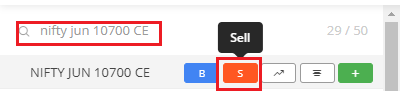
2. On the Home Page, go to the Watchlist on the left-hand side and Search the required Call Strike to sell the CE Option and click on S button. As an example, we are selling NIFTY JUN Series 10700 CE Option as shown below. You can also select any Stock which is open for FnO trading.:-
How To Sell Call Options in Zerodha
How To Sell CALL Options in Zerodha
3. On the Next Screen, fill Sell Order details as shown below. To keep it simple, we are selling 1 LOT (equal to 75 Shares) of NIFTY at a selling price of 20. The last traded price for JUN Series 10700 CE Strike is 14.10.

With INR 20 as your Sell Price, you will receive a Total Premium of 20x75 = INR 1500 from Buyer.

It is a positional order, meaning we are not selling this Call Option for Intraday Trading. Once you fill all the details, click on Sell button:-

HDFC Mutual Fund - 6 Easy Steps To Sell or Redeem and Withdraw Your Money


Finance Guru Speaks: This article will provide information on how you can Online Redeem or Sell and withdraw your Money from HDFC Mutual Fund.


In this article, we are showing steps to Sell HDFC Short Term Debt Fund. You may select any other Mutual fund scheme, steps will remain the same. Make sure to update your Email and Mobile correctly against your Folio No.

If you are an existing HDFC Mutual Fund investor, then first of all, get registered to its HDFC Mutual Fund website. You can follow the options mentioned here.

Steps to follow to online Sell or Redeem in HDFC Mutual Fund:-


1.  Open HDFC Mutual Fund website and click on Login via OTP link. Provide your User ID and PAN and click SEND OTP button:-
HDFC Mutual Fund Login Page
2. OTP will be sent to your registered Email and Mobile No. Enter the OTP, click on LOGIN button:-
HDFC Mutual Fund - Login
HDFC Mutual Fund - Sell or Redeem
3. In the Home page, click on Transact Now and then Redemption as shown below:-
How to Redeem or Sell and Withdraw your money from HDFC Mutual Fund
HDFC Mutual Fund - Sell or Redeem
4. On the Next Screen, provide details like your Folio No., Mutual Fund to Redeem (HDFC Short Term Debt Fund as per our example), Amount to Withdraw, and Bank


Click on Proceed to Transact button:-
How to Redeem or Sell and Withdraw your money from HDFC Mutual Fund
Click to enlarge - HDFC Mutual Fund - Sell or Redeem
5. On the Next Screen, accept Terms & Conditions and click on Complete Transaction button, as shown below:-
How to Redeem or Sell and Withdraw your money from HDFC Mutual Fund
Click to enlarge - HDFC Mutual Fund - Sell or Redeem
6. On the Next Screen, Accept the Read/Agree and click on Redeem button:-
How to Redeem or Sell and Withdraw your money from HDFC Mutual Fund
Click to enlarge - HDFC Mutual Fund - Sell or Redeem

Congratulations on your successful Online Redemption or Sell of HDFC Mutual Fund. The redemption amount will be credited to your registered Bank Account.
How to Redeem or Sell and Withdraw your money from HDFC Mutual Fund
Click to enlarge - HDFC Mutual Fund - Sell or Redeem

Images Courtesy: HDFC Mutual Fund Website

Please help to like, share and comment on this article over your Social Networks. Thanks.
Also read:

How To Sell or Redeem Online From ICICI Prudential Mutual Fund?


Finance Guru Speaks: This article will provide information on how you can Online Redeem or Sell and withdraw your Money from ICICI Prudential Mutual Fund.

How to Withdraw Money from ICICI Prudential Mutual Fund


In this article, we are showing steps to Sell ICICI Prudential Long Term Bond Fund. You may select any other Mutual fund scheme, steps will remain the same. Make sure to update your Email and Mobile correctly against your Folio No.

Steps to follow to online Sell or Redeem in ICICI Prudential Mutual Fund:-


1.  Open ICICI Prudential Mutual Fund website and click on LOGIN button after providing your UserName and Password:-
ICICI Prudential Mutual Fund - Login Page
NOTE: If you don't have access to their website, then you can register your Folio by following instructions mentioned in this link. It will help to generate your User Name and Password to login.

2. In the Home page, click on MY PORTFOLIO link as shown below:-
ICICI Prudential Mutual Fund - Redeem
ICICI Prudential Mutual Fund - Sell
3. Click on VIEW ALL FOLIOS button:-
ICICI Prudential Mutual Fund - Redeem
Click to enlarge - ICICI Prudential Mutual Fund - Sell
4. On the Next Screen, against ICICI Prudential Long Term Bond Fundclick on REDEEM button, as shown below:-
ICICI Prudential Mutual Fund - Redeem
Click to enlarge - ICICI Prudential Mutual Fund - Sell
5. On the Next Screen, check your registered Bank. Select All Units if you want to redeem or sell the Mutual Fund completely. Else, enter no. of Units or Amount which you want to redeem. Accept the T&C's and click on REDEEM button:-


ICICI Prudential Mutual Fund - Redeem
Click to enlarge - ICICI Prudential Mutual Fund - Sell
6. On the Next Screen, Accept the Read/Agree and click on REDEEM button:-
ICICI Prudential Mutual Fund - Redeem
ICICI Prudential Mutual Fund - Sell
7. On the Next Screen, enter the received OTP on your Mail/SMS and click on Confirm button:-
ICICI Prudential Mutual Fund - Redeem
ICICI Prudential Mutual Fund - Sell
Congratulations on your successful Online Redemption or Sell of ICICI Prudential Mutual Fund. The redemption amount will be credited to your registered Bank Account.
ICICI Prudential Mutual Fund - Redeem
Click to enlarge - ICICI Prudential Mutual Fund - Sell


Images Courtesy: ICICI Prudential Mutual Fund Website

Please help to like, share and comment on this article over your Social Networks. Thanks.
Also read:

How To Sell or Redeem Online From Franklin Templeton Mutual Fund?


Finance Guru Speaks:
This article will provide information on how you can Withdraw or Sell or Redeem your Money from Franklin Templeton Mutual Fund.

How to withdraw or redeem from Franklin Templeton Mutual Fund


As an example, we have taken Franklin India Smaller Companies Fund to redeem the fund and withdraw the Money. 

Please note that Franklin Templeton Fund House has wound up below Schemes with effect from the Cut-off timings of 23rd Apr 2020 and hence, you cannot perform any operations on these funds, including Withdrawing your Money. You need to wait from the Fund House for further communications on your already invested Money.

  • Franklin India Ultra Short Bond Fund (FIUBF)
  • Franklin India Short Term Income Fund (FISTIP)
  • Franklin India Credit Risk Fund (FICRF)
  • Franklin India Low Duration Fund (FILDF)
  • Franklin India Dynamic Accrual Fund (FIDA)
  • Franklin India Income Opportunities Fund (FIIOF)

Hence, the steps mentioned in this article cannot be applied to the above funds (unfortunately). However, you may select any other Mutual fund scheme, steps will remain the same. 

Make sure to update your Email and Mobile correctly against your Folio No.

If you are an existing Franklin Mutual Funds investor, then, first of all, get registered to the Franklin Templeton Investments India website.

Please click this link and follow the instructions to get your Folio No. registered with the Franklin India website.


After successful registration, you will get your Username and Password to access Franklin India MF Online.


Steps to follow to online Withdraw or Redeem in Franklin Templeton Mutual Fund:-


1. Open Franklin Templeton Investments India - Investor Login website.

2. Provide your Username and Password and click on LOGIN button.
Franklin Mutual Fund - Redeem
Franklin Mutual Fund - Login
3. In the Home page, click on Transact -> Redeem as shown below:-
Franklin Mutual Fund - Redeem