How To Download e-PAN Card Applied Through UTIITSL?


Finance Guru Speaks: This article will provide you detail on how you can generate or download your e-PAN Card. PAN applicants can download their e-PANs directly using the steps mentioned in this article, provided they have issued their PAN through UTIITSL.

Download Your e-PAN Card
e-PAN Card becomes very handy especially when due to any reasons you haven't received your physical PAN Card.

Steps to download or generate your e-PAN Card:-


1. Open UTIITSL Website by clicking here.

2. Enter your PAN No. and Date of Birth (MM/YYYY format) and click on Submit button:-
Download Your e-PAN Card
Click to enlarge - Download Your e-PAN Card
3. On the Next page, generate OTP on your registered Email/SMS. Click on Get OTP button as shown below:-

How To Verify Your PAN Card No.?


Finance Guru Speaks: This article will provide you detail on how you can verify your PAN Card No. without logging to Income Tax department website.


Steps to verify your PAN No. :-

1. Open Income Tax India E-Filing Website by clicking here.

2. On the left-hand side, under Quick Links section, you can click Verify Your PAN Details link:-
Verify Your PAN Details
3. In the Next page, enter your PAN details as shown below:-


Verify Your PAN Details
Congratulations to verify your PAN Card details against the Income Tax records.
Verify Your PAN Details
NOTE: Incase your PAN No. is correct however other details like Date of Birth or Full Name is not matching as per records then you can see below message:-
Verify Your PAN Details

Images Courtesy: Income Tax Department Website

How To Recover or Reset Income Tax India eFiling Login Password?


Finance Guru Speaks: Have you forgot your Income Tax India eFiling Password and wondering how to recover or reset it? If yes, then this article will take care of your concerns!


Please follow simple steps to recover or reset Income Tax India eFiling Login Password as shown below:-


 1. Open Income Tax India eFiling Portal by clicking here
  
 2. As shown below, Click on Forgot Password? link as shown below :-
Income Tax India-Forgot Password
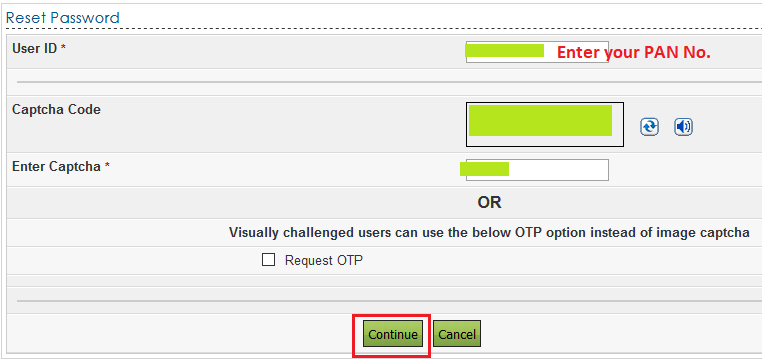
 3. In the Next Screen, provide your PAN No and Enter Captcha as shown below:-
Income Tax India-Forgot Password
 4. In the Next Screen, verify your records with the mentioned options. In this case, we are selecting Using OTP option to authenticate ourselves. .
Income Tax India-Forgot Password
5. In the Next Screen, we are selecting option to get the OTPs against registered EMail and Mobile No. OTP will be sent against your registered Mobile No. and Email ID which is stored against your Income Tax records:-


Income Tax India-Forgot Password
 6. In the Next Screen, provide the received OTPs (EMail and Mobile) and click on Validate, as shown below:-
Income Tax India-Forgot Password
7. In the Next Screen, provide new Password which you want to set now and click on Submit. Make sure to follow the Password policy as mentioned. :-
Income Tax India-Forgot Password

Congratulations!! Your Income Tax India eFiling Password is now reset successfully. :-)


Images Courtesy: Income Tax India eFiling Portal

  Please share this article over social networks. For more Learning, Please visit "At A Glance" Section.

ITR-V : How To e-Verify Your IT Returns Using Aadhaar?


Finance Guru Speaks: This article will provide you details on how you e-Verify your Income Tax Returns using Aadhaar.


Once you file your IT returns, you need to e-Verify it. Income Tax Return filed by Taxpayer is not treated as valid until it is E-Verified by the Taxpayer. In existing process, taxpayer can verify by sending signed ITR-V to CPC (Optional) using Courier or Speed-post.

The Income Tax Department has introduced a system of e-verification of returns as an alternate for sending signed ITR-V to CPC.
 
This requires you to be registered on Income Tax Department E-filing website and your details like Mobile No. should be linked with Aadhaar No.

Steps to e-verify your IT Returns using Aadhaar:


1. Login to Income Tax Department e-Filing Website.
Income Tax Website Login
2. As shown below, click on View Returns/Forms link under Dashboard section.
e-Verify IT Returns
e-Verify IT Returns
3. Click on link Click here to view your returns pending for e-Verification as shown below:-

e-Verify IT Returns
e-Verify IT Returns
4. Click on link e-Verify as shown below:-
e-Verify IT Returns
e-Verify IT Returns

Download FORM NO.12BB

Finance Guru Speaks: This article will provide you FORM 12BB.


Download Form 12BB
Download Form 12BB


Click the link to download : DOWNLOAD FORM 12BB


  Please share this article over social networks. For more Learning, Please visit "At A Glance" Section.

Know About Income Tax Department - Certificate of Appreciation


Finance Guru Speaks: As a very surprising step, Income Tax Department has started to issue "Certificate of Appreciation" for acknowledging Individual Tax Payers contributions towards paying taxes within the prescribed time and prompt filing of Income Tax Returns.

This step marks the first effort by the Government to directly communicate to the tax payer its appreciation for their contribution towards Nation Building.

CBDT has started sending out this certificates to individual tax payers by e-mail in various  categories on the basis of the level of taxes paid by them for the current Assessment Year 2016-17  where taxes have been paid in full and tax payers have no outstanding tax liabilities and where the return is e-filed within the prescribed due date.

Income Tax Department Certificate of Appreciations are divided into below categories:-


1. Platinum : Tax contributed Rs 1 Crore and above 
2. Gold : Tax contributed Rs 50 Lakh to Rs 1 Crore
3. Silver : Tax contributed Rs 10 Lakh to Rs 50 Lakh
4. Bronze : Tax contributed Rs 1 Lakh to Rs 10 Lakh


Below is the Bronze Certificate of Appreciation released by Income Tax Department :-


CBDT - Income Tax Department - Certificate of Appreciation

The CBDT urges taxpayers to e-file their returns in time and verify their return by submitting the Electronic Verification Code online or sending their ITR-V within the 120 day period so that they can be also acknowledged for their contribution.


Images Courtesy: Income Tax Department, India

  Please share this article over social networks. For more Learning, Please visit "At A Glance" Section.

How to Pay Your Income Tax Amount Online?

Finance Guru Speaks: This article will guide you on how you can pay our taxes online while filing Income Tax Returns form.

This article is created for Individual Tax Payers who want to pay Self-Assessment Tax.

For demonstration purpose, I have considered Financial Year (FY) 2015-16 (Assessment Year 2016-17) for e-payment of Income Tax online.

Steps to Pay Self-Assessment Income Tax Online :-


1. Open Tax Information Network website.

2. As shown below, click on e-payment : Pay Taxes Online link :-
e-payment : Pay Taxes Online
Click to enlarge - e-payment : Pay Taxes Online

3. Now click on Click to pay tax online link :-

e-payment : Pay Taxes Online
Click to enlarge - e-payment : Pay Taxes Online

4. Click on Challan No. 280 under Non-TDS/TCS section :-

CHALLAN NO. 280
Click to enlarge - CHALLAN NO. 280
5. In the Next Page, fill the details carefully. Select 0021 Tax Code, provide correct PAN No., Select Assessment Year as 2016-17 (for FY 2015-16), Provide your present address, Email ID, Mobile No., Type of Payment as (300) SELF ASSESSMENT TAX, Select Bank through which you will pay the Income Tax through Internet Banking, etc. Click on Proceed button :-
e-payment fill details
Click to enlarge - e-payment fill details

Note: The provision to enter Tax Amount to Pay is provided in the Bank's website.

How to Check Status of Income Tax Return Online?

Finance Guru Speaks: Wondering how to check income tax return filing status online or acknowledgement of your filed ITR online? Every year we fill our Income Tax Returns form and send it to Income Tax department. This article will guide on how we can check whether Income Tax dept has successfully received your filled ITR-V form.

How to check ITR-V Receipt (Income Tax Return) Status Online:-


1. Open Income Tax Dept web page.

2. Provide either PAN and Assessment Year OR eFiling Acknowledgement Number , as shown below :-
ITR-V Receipt Status
Click to enlarge - ITR-V Receipt Status

3. Once you click on Submit, you can get the status in the Next page :-

ITR-V Receipt Status
Click to enlarge - ITR-V Receipt Status

This is how you can check the status of  ITR-V Receipt.


Images Courtesy: Income Tax Department, India Website


Also Read:


  Please share this article over social networks. For more Learning, Please visit "At A Glance" Section.

Budget 2016: No Change In Income Tax Slabs

Finance Guru Speaks: Today Union Budget 2016 has been announced.

Below are the key points for tax payers:-


Budget 2016-Tax Payers
1. Surcharge on income tax for individuals whose incomes exceeding 1 Crore per annum raised from 12% to 15%.

2. No change in income tax slabs in 2016-17 budget.

3. First-time home buyers to get additional deduction of Rs 50,000 on interest for loan upto Rs 35 lakh. The cost of house should not be more than Rs 50 lakh.

4. Deduction for rent paid will be raised from Rs 20,000 to Rs 60,000 to benefit those living in rented houses.

5. Ceiling of tax rebate for tax payers with up to Rs 5 lakh annual come to be raised to Rs 5000 from Rs 2000 currently. It means a relief of Rs 3000 per year. 

FY 2015-16 Income Tax Slabs:-

For an Individual (Male or Female) :

Income Tax Rate FY 2015-16
For a resident Senior Citizen (Age 60 to 80) :
 
Income Tax Rate FY 2015-16 for Senior Citizens


For a resident Super Senior Citizen (More than 80 years of age) :

Income Tax Rate FY 2015-16 for Super Senior Citizens

 
Please share this article over social networks. For more Learning, Please visit "At A Glance" Section.

How To Pay Income Tax Online In India?

Finance Guru Speaks: This article will provide information on how you can pay your direct Income Tax using Online facility provided by Income Tax department. This article is meant for Individual Tax Payers.

Below are the steps to be followed:-

1. Open TIN (Tax Information Network) website by clicking here.

2. Click on "e-payment : Pay Taxes Online" link, as shown below:

Pay Income Tax Online
Click to enlarge - e-payment Pay Taxes Online
3. Now, click on "Click to pay tax online" link, as shown below:
Pay Income Tax Online
Click to enlarge - Pay Income Tax Online
 4. Click on "CHALLAN NO./ITNS 280" link, as shown below:
Challan 280 Pay Tax Online
Challan 280
5. Fill in the details after providing your PAN No. in the below screen:
  
Individual Tax Payers: Select/Fill the options as shown in the screen for paying the Direct Income Tax for FY 2014-15 (i.e. AY 2015-16)
Pay Income Tax Online
Click to enlarge -  Pay Income Tax Online Form
Select the Bank through which you want to pay the income tax using Internet Banking facility. Then click on "Proceed" button which is given at the bottom of the above page.